
Capabilities
See what users actually ask your agent to do, grouped into use cases, with satisfaction and the friction in each.
Capabilities answers a question the dashboards can't: what do people actually use your agent for? Trodo reads the input of every run, groups runs into the broad task types users invoke, and shows how well each one is served. In the product this is the Use Cases view.
What a capability is
A capability is a broad task type derived from the query input, independent of how the agent handled it. For a travel agent that might be "Booking", "Cancellation", and "Refunds". A run can belong to more than one capability (it is multi-label), and each run also carries a satisfaction score on a separate axis.
Input-derived
Capabilities come from what users ask for, not from clustering outputs or guessing intent.
Multi-label
One run can map to several capabilities, with a confidence per assignment.
Satisfaction
Each capability rolls up a satisfaction score so you see which tasks frustrate users.
Subjects
A second axis: the data subject behind a request (flights, loans, users), per capability.
How it works
The pipeline runs per agent: it discovers the set of capabilities from a sample of runs, classifies every run into them, and writes an analysis for each.
- DiscoverAn LLM reads a sample of run inputs and proposes a small set of broad capabilities.
- ClassifyEvery run is assigned to its closest capabilities by embedding similarity. No LLM here.
- AnalyseAn LLM writes a summary, friction points, worst examples, and recommendations per capability.
Two cadences keep this current:
- Real-time: a new run is classified into the agent's existing capabilities the moment it is embedded, so counts stay live. On a brand-new agent it waits until the first discovery forms the set.
- Rediscovery: periodically (hourly), Trodo re-runs the full pipeline for agents that need it (new agents, lots of new runs, a backlog of low-confidence runs, or a stale set). This is where new capabilities are formed.
Using Use Cases
The view has two layouts and a detail drawer.
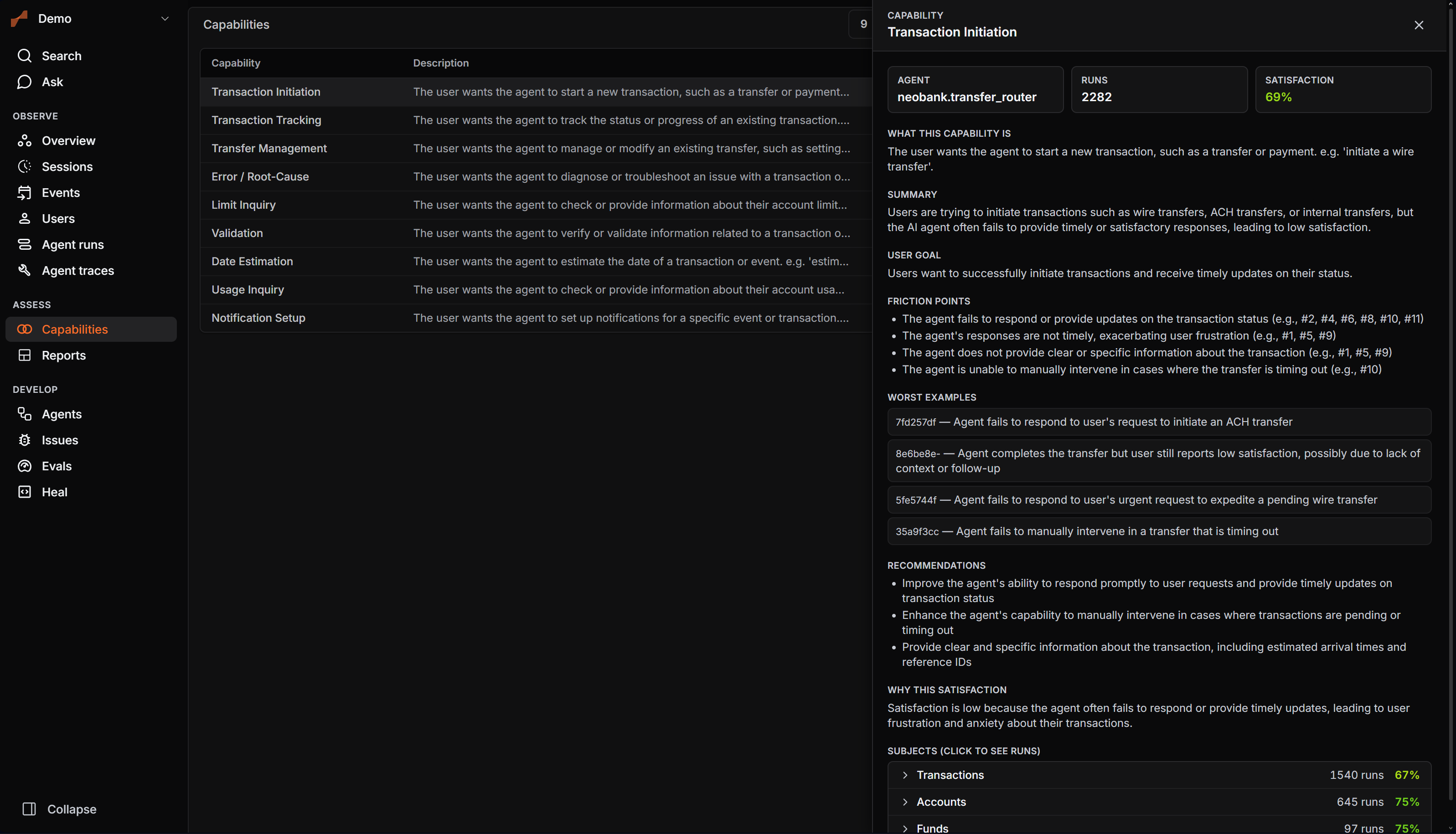
- List: capabilities sorted by volume, with name, definition, run count, satisfaction, and top subject. Filter by agent and search by name.
- Map: a spatial layout placing capabilities by similarity with run dots around each.
- Drawer: click a capability for KPI tiles, the definition, the LLM analysis (summary, user goal, friction points, worst examples that link to the runs, recommendations), and the subjects, each expandable to its runs.
A run's detail page shows the capabilities it belongs to.
FAQ
Next
- Observability for the runs behind capabilities
- Reports to chart agent activity