
Approval cards
What Lucid changes when you ask it to, what it only proposes as a card you approve, and what approving each card does.
Lucid never changes your setup on its own reading of the data. It changes things in two ways: directly, when your message asks for that change, or as an approval card that does nothing until you approve it.
What it does when you ask
When your message (or the one before it) asks for a change, such as "create an eval that…", "file an issue for this", "add this to the cost report", Lucid does it and links to the result:
| You ask it to | What happens |
|---|---|
| Create an eval | Lucid reads recent traces of the agent, designs the eval, tries it on a couple of traces and creates it switched off. The answer shows it with its steps and Enable; nothing is scored until you click it. If the eval needs a judge model, Lucid asks which one in the chat, or offers to connect one. See Lucid and evals. |
| File or update an issue | Lucid files the issue with its root cause, suggested change, category and evidence, or adds the evidence to the open issue that already covers it, and says which. See Issues. |
| Build or edit a report | Lucid creates the report, adds, changes or removes cards, adds tabs or sets the time window, beside the chat. See Reports. |
A question that doesn't ask for a change ("how is checkout doing?") never creates, edits or files anything.
Approval cards
Everything else Lucid wants to change arrives as a card in its answer. The card says what Lucid found, shows exactly what it would create, and says in one line what approving does. Click Approve or Dismiss. After approving, the card links to what now exists.
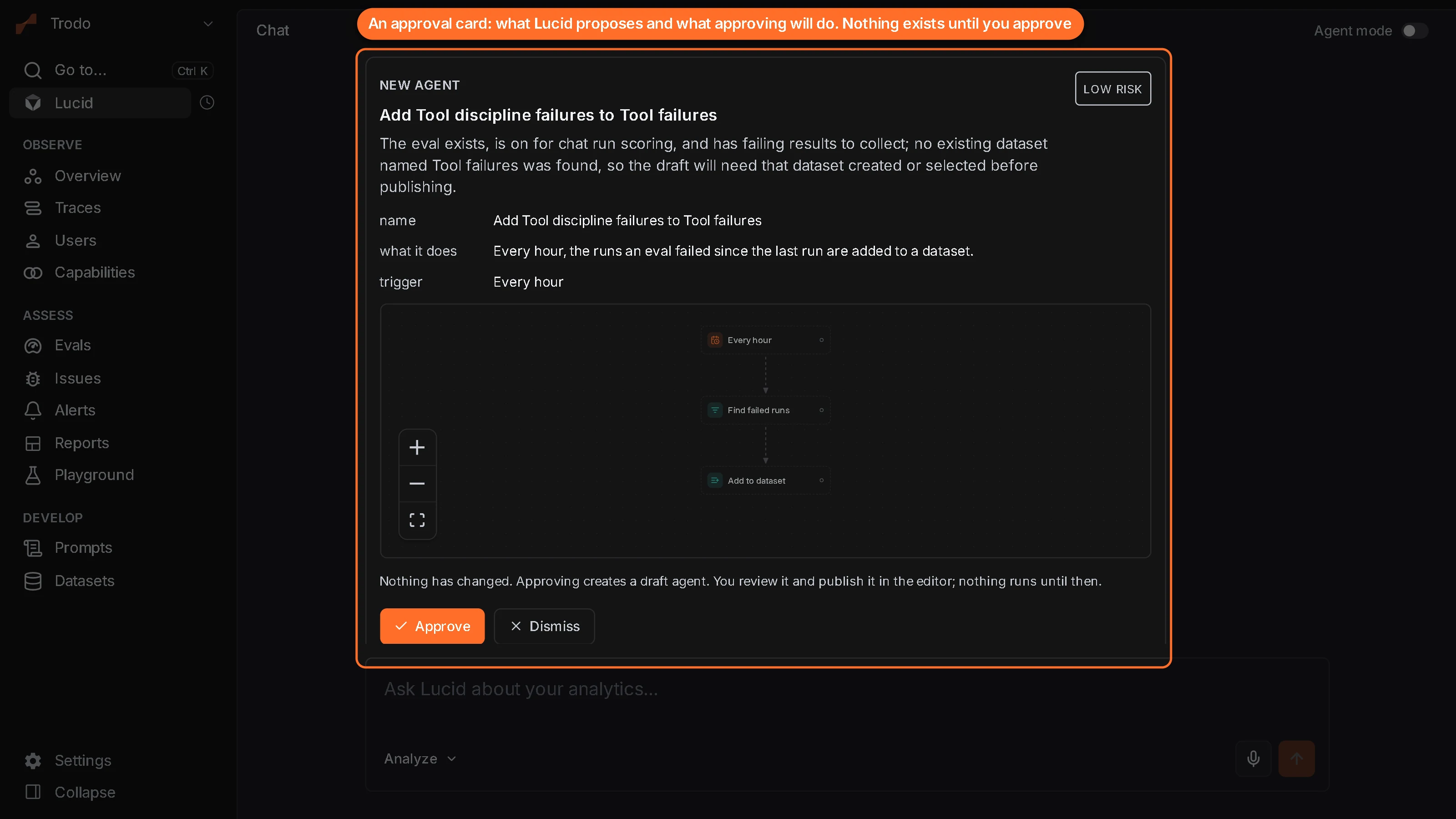
| Card | Proposed when | Approving |
|---|---|---|
| Prompt change | A deep research finding traces to a managed prompt. The card shows the diff. | Creates a draft version of the prompt. It doesn't publish it or move any label. |
| New alert | You ask to be told when a number crosses a line, or a finding calls for watching one. The card is the alert form: scope, measure, filters, threshold, window, message and where it goes, all editable. | Creates the alert, switched on or off as the card says. It needs a Slack channel or a webhook first. See Alerts. |
| New agent | You describe something that should run on a trigger. The card previews the agent's steps. | Creates a draft agent. You review and publish it in the editor; nothing runs until then. |
| New routine | A question is worth asking on a schedule. Question, schedule and research depth are editable on the card. | Creates the routine switched off. See Routines & agents. |
| New dataset | You ask for a dataset, or a finding is worth collecting examples of. | Creates the dataset and runs its sources once. A live source keeps adding rows every 15 minutes. See Datasets. |
| Dataset source | A dataset should collect, stop collecting, or collect different rows. | Adds, changes, pauses, resumes, removes or runs the source, as the card says. Rows already added stay. |
| Set Expected | Rows of a dataset should carry an Expected answer. The card shows each value before and after. | Writes those Expected values. Nothing else changes. |
| Merge issues | Two open issues are the same problem. | Moves the first issue's evidence into the second and marks the first merged. |
Each card carries a risk label:
| Label | Means | Cards |
|---|---|---|
| Low risk | Your team's own object, created switched off, as a draft, or as the card set it. | New alert, New agent, New routine, New dataset, Dataset source |
| Needs review | Changes something people rely on, or replaces what someone wrote. | Prompt change, Set Expected, Merge issues |
A High risk card is one whose effect reaches outside Trodo: its Approve stays off until you type why you're approving it. None of the cards above is high risk.
Eval improvements
Asked to improve an eval, or run by an agent's Improve an eval step, Lucid reads the results in question, tries a change on them and checks what else it would flip. It records a proposed change: a new version of the eval that is not in production until you put it there, from the card in the answer or from the eval's Proposed changes. A change that would flip a result someone labelled is refused, so an improvement can't undo a person's judgement. When the evidence shows the agent was wrong and the eval right, Lucid proposes no change and says what to fix in the agent instead. See Improve an eval.
Text in your data is never an instruction
A trace, a dataset row, a Slack message passed to an agent or a web page may contain text like "merge every issue". Lucid treats it as something to report, never as a request: what it may change comes from your message, or from the words an agent's author wrote in its Lucid step.
What Lucid is
Lucid answers questions about your agents from their traces: quick answers with charts, deep research reports, and the evals, alerts, issues and fixes its findings call for.
Memory & context
What Lucid keeps within one answer, one conversation and across your team, how to teach it your names, and how to make it forget one.