
Traceability
Every model call records the prompts and exact versions it ran, fallbacks included, so a trace always shows what ran even after a label moves. Optionally, the values it was compiled with too.
A label like production moves, so "it used production" doesn't say what a run from last week ran. Trodo records the exact version instead. When you compile a prompt, the SDK stamps its name and version on the spans that used it, with no code from you. Move the label as often as you like: a trace still shows what ran, and opens that exact version.
See it in a trace
Open a run in Traces and select a model call. Prompt (or Prompts, when the call was built from several) lists each prompt with its version. The name opens the prompt as it is now; the version opens the editor on the exact version that ran. In the span tree, each model call shows its prompt beside its name.
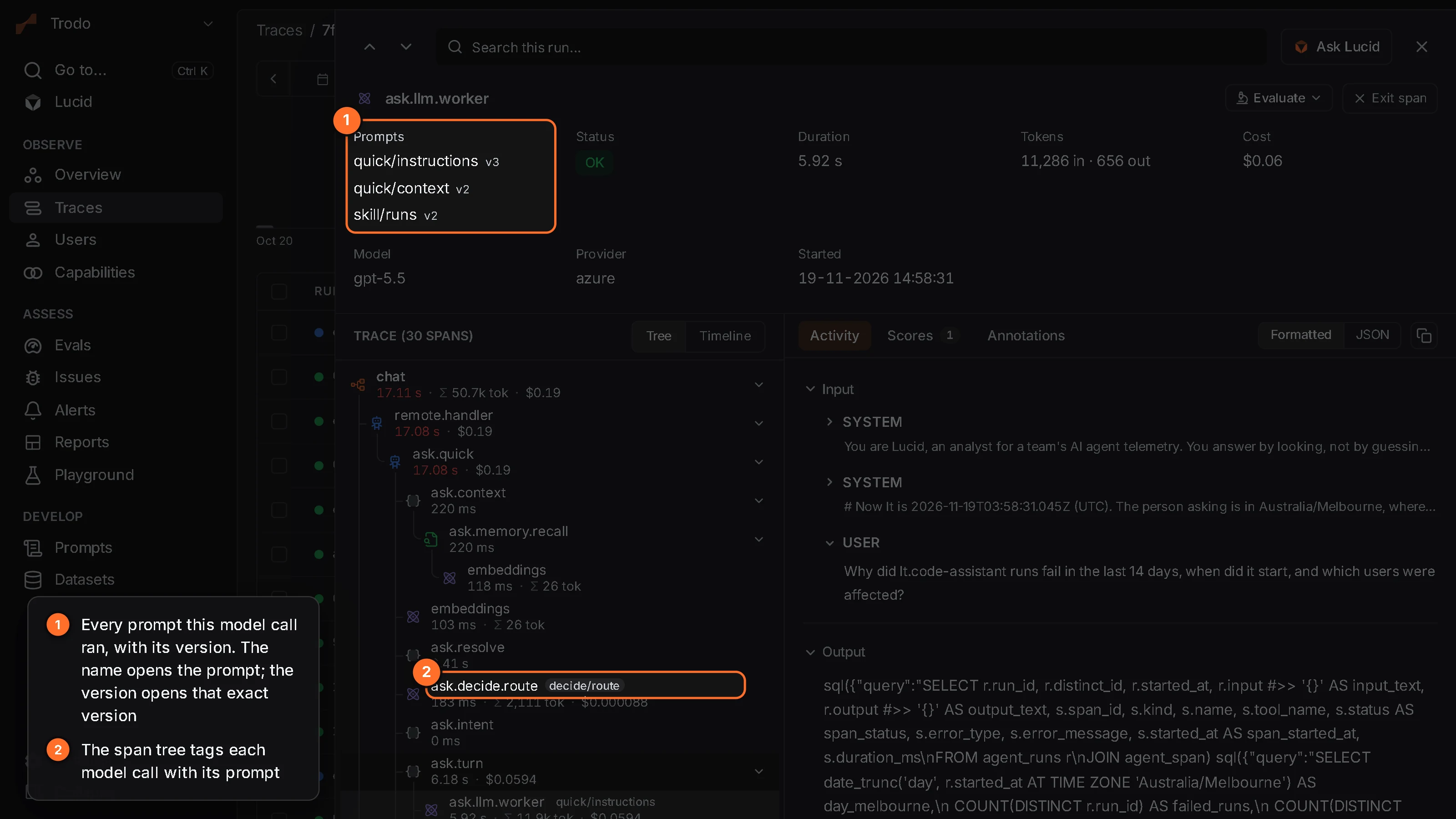
Each version's own traffic, from these spans, is under ⋯ → Usage in the editor. See Usage.
Which spans record it
Call compile inside your agent's run and run your model call as usual:
await trodo.wrapAgent('support-agent', async (run) => {
  const prompt = await trodo.prompts.get('refund-agent');
  const { messages, model } = prompt.compile({ question });
  // the model call's span records refund-agent and its version
  return openai.chat.completions.create({ model: model.model ?? 'gpt-4o', messages });
});
with trodo.wrap_agent("support-agent") as run:
prompt = trodo.get_prompt("refund-agent")
compiled = prompt.compile(question=question)
# the model call's span records refund-agent and its version
openai.chat.completions.create(model=compiled.model.get("model", "gpt-4o"), messages=compiled.messages)A prompt is recorded on the spans that used it, not on every span in the run:
- Model calls in the run, captured automatically or wrapped with
trodo.llm(...). Each records the prompt compiled most recently before it. - A span whose input is the compiled prompt or its messages, wherever you compiled it.
- The span you compiled it in, such as a
withSpanaround a model call you make by hand. - A model call outside the run: if you compiled before the run started, an automatically captured model call that receives exactly those messages is still linked. The match must be exact, so messages you change after compiling are not linked. The SDK keeps only hashes for this, for 10 minutes and up to 256 prompts.
Tools, retrievals and other steps don't record a prompt they didn't run. The run itself lists every prompt and version used anywhere in it.
When one model call is built from several prompts, such as a system prompt plus a context block, the span lists all of them, in the order they were compiled.
Fallbacks are traced too
When get returned your fallback because Trodo couldn't be reached, the span still records the prompt name, marked as a fallback and with no version, and the trace shows fallback beside it. So a run on your fallback text is never mistaken for a run on a saved version.
Record the values
To also record the values each compile received, pass recordVariables: true (Python record_variables=True) to get. With them, a span opened in the Playground comes with the values it ran with, so you can replay the exact call. It is off by default because values are often user data.
const prompt = await trodo.prompts.get('refund-agent', { recordVariables: true });prompt = trodo.get_prompt("refund-agent", record_variables=True)Values are recorded as text, each cut at 2,000 characters. If they add up to more than 16,000 characters, none are recorded, since a partial set would replay a different prompt.
Span attributes
These are set for you, on spans exported over OTLP as well:
| Attribute | What it is |
|---|---|
trodo.prompt.name | The prompt's name. |
trodo.prompt.version | The version's number, such as 3. |
trodo.prompt.version_hash | The version's full hash: pass it to get as version to fetch exactly what ran. |
trodo.prompt.label | The label the fetch followed (production when you passed none). Not set when you pinned a version. |
trodo.prompt.content_hash | A hash of the content alone: two versions with the same content share it. |
trodo.prompt.fallback | true when the fallback ran. The version and hashes are then absent. |
trodo.prompt.variables | The compiled values, as JSON, only with recordVariables. |
trodo.prompts | Every prompt in this call, as a JSON list of { name, version, version_hash } (fallback: true for a fallback), when there is more than one. On the run: every prompt the run used. |
trodo.prompt.* describes the main prompt, the one compiled last.
Fetch in production
Fetch a prompt with get, fill it with compile, pick a label or an exact version, and keep the fetch off your critical path with caching and a fallback.
SDK reference
Every prompt method in trodo-node and trodo-python: get, compile, list, renderTemplate and clearCache, with their options, return shapes and errors.