
Variables & templating
Variables are found in your messages and filled in by compile, with an optional default each. Placeholders insert a list of messages, sections loop over lists, and \{{…}} writes braces literally.
A variable is a {{name}} in a message that your code fills in at run time. Trodo finds every variable in the messages, so it knows exactly which values a prompt takes: a value you leave out gets its default, and a value the prompt doesn't take is caught before anything reaches the model.
Variables in the editor
Write {{name}} in any message and it shows in orange, and Variables under the messages counts it. Open Variables to set a Default for each one: what it renders as when your code leaves it out. Without a default, it renders empty.
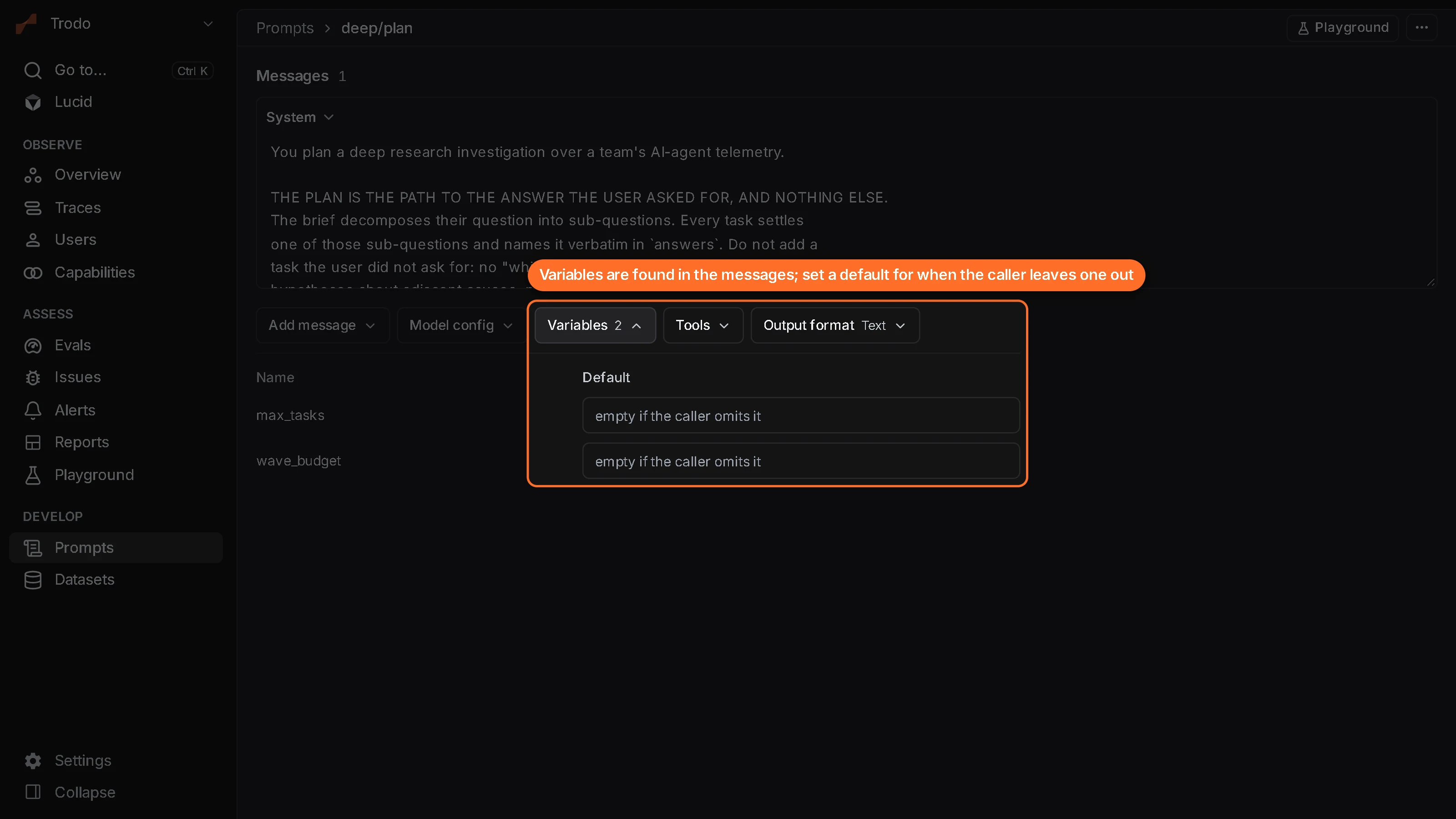
The list follows the messages: rename {{name}} in a message and the variable follows. Names start with a letter or _ and hold letters, numbers and _.
Some variables carry a type, shown beside the name:
| messages | A placeholder: a list of messages your code passes in. |
| json | A name used as a section, {{#items}}...{{/items}}: pass a list or an object. |
| item | A name used only inside a section: each item of the list supplies it, and its Default is used when an item leaves it out. |
Pass values
Pass the values to compile. Python also takes them as keyword arguments.
const { messages } = prompt.compile({
  company: 'Acme',
  question: 'Where is my refund?',
});
compiled = prompt.compile(company="Acme", question="Where is my refund?")For each variable, compile uses your value, else its default, else empty. A missing value is never an error.
Passing a value for a variable the prompt doesn't have is an error: it is nearly always a typo or a rename that didn't reach your code. compile throws CompileError before any model call, listing every unknown name.
Placeholders
A placeholder inserts a list of messages at its place in the conversation, most often the chat history. Add one with Add message → Placeholder; it gets a name such as chat_history, which becomes a messages variable. Pass it a list of messages:
prompt.compile({
  question: 'And the one before that?',
  chat_history: [
    { role: 'user', content: [{ type: 'text', text: 'Where is my order?' }] },
    { role: 'assistant', content: [{ type: 'text', text: 'It ships tomorrow.' }] },
  ],
});
prompt.compile(
question="And the one before that?",
chat_history=[
{"role": "user", "content": [{"type": "text", "text": "Where is my order?"}]},
{"role": "assistant", "content": [{"type": "text", "text": "It ships tomorrow."}]},
],
)The messages go in exactly as passed. Their text is never read as a template, so history can contain braces safely. Left out, a placeholder inserts nothing.
Template syntax
The same engine renders a prompt in the app, the Playground and both SDKs, so a prompt renders identically everywhere.
| Syntax | Meaning |
|---|---|
{{name}} | The value of name. |
{{a.b}} | A field of an object value. |
{{#items}}...{{/items}} | A section: rendered once per item if items is a list, once if it is any other truthy value, not at all if it is empty or false. |
{{^items}}...{{/items}} | Rendered only when items is empty or false. |
{{.}} | The current item, inside a section over a list of strings. |
{{! note }} | A comment, removed. |
\{{name}} | The text {{name}} itself: the backslash is dropped and nothing is filled in. |
Values are inserted as they are, with no escaping. Partials ({{> x}}), {{& x}} and custom delimiters are not supported: rendering a template that uses them throws a TemplateError that says so, as does an unclosed {{ or section.
Sections and lists
A section repeats its body for each item of a list, which suits few-shot examples:
{{#examples}}
Q: {{question}}
A: {{answer}}
{{/examples}}
examples is a json variable, and question and answer are item fields: each item supplies them, so you don't pass them to compile yourself.
prompt.compile({
  examples: [
    { question: 'Where is my order?', answer: 'It ships tomorrow.' },
    { question: 'Can I return it?', answer: 'Yes, within 30 days.' },
  ],
});prompt.compile(examples=[
{"question": "Where is my order?", "answer": "It ships tomorrow."},
{"question": "Can I return it?", "answer": "Yes, within 30 days."},
])Literal braces
To write {{ in a prompt without making a variable, for instance when the prompt teaches the model a template format, put a backslash before it: \{{span.input}} renders as {{span.input}} and is not a variable.
Values are never templates
A value is inserted as text and never read again. If a user's message contains {{question}}, the model sees those characters, not another variable's value. So user input passed as a variable can't inject template syntax.
Render a template without a prompt
renderTemplate (Python render_template) runs the same engine on any string. It is strict: a name it has no value for throws, unless you pass strict: false (strict=False), which renders it empty.
import { renderTemplate } from 'trodo-node';

renderTemplate('Hi {{name}}', { name: 'Ada' });        // 'Hi Ada'
renderTemplate('Hi {{name}}', {}, { strict: false });   // 'Hi '
from trodo import render_template
render_template("Hi {{name}}", name="Ada") # 'Hi Ada'
render_template("Hi {{name}}", strict=False) # 'Hi 'Concepts & versions
Names, immutable versions, movable labels, the editor and its menu, saving with a diff, history and compare, shipping and rolling back, who can edit, and each version's usage.
Model, tools & output format
The model config, tool definitions and output format a version stores beside its messages: how to set them in the editor, what Trodo checks, and how your code reads them back.