
Datasets
Make datasets from a filter, add rows and references, write Expected from your own scripts, and export them, from the terminal.
A DATASET argument is the dataset's name (exact, then case-insensitive) or its id.
List and read
trodo datasets list --table
trodo datasets get "Refund failures"        # the dataset, its sources and recent versions
trodo datasets versions "Refund failures" --table
Create, with a source
trodo datasets create "Refunds that went well" --kind runs --since 30d \
  --agent support --eval "Refund policy:passed" --include-trace [--live]
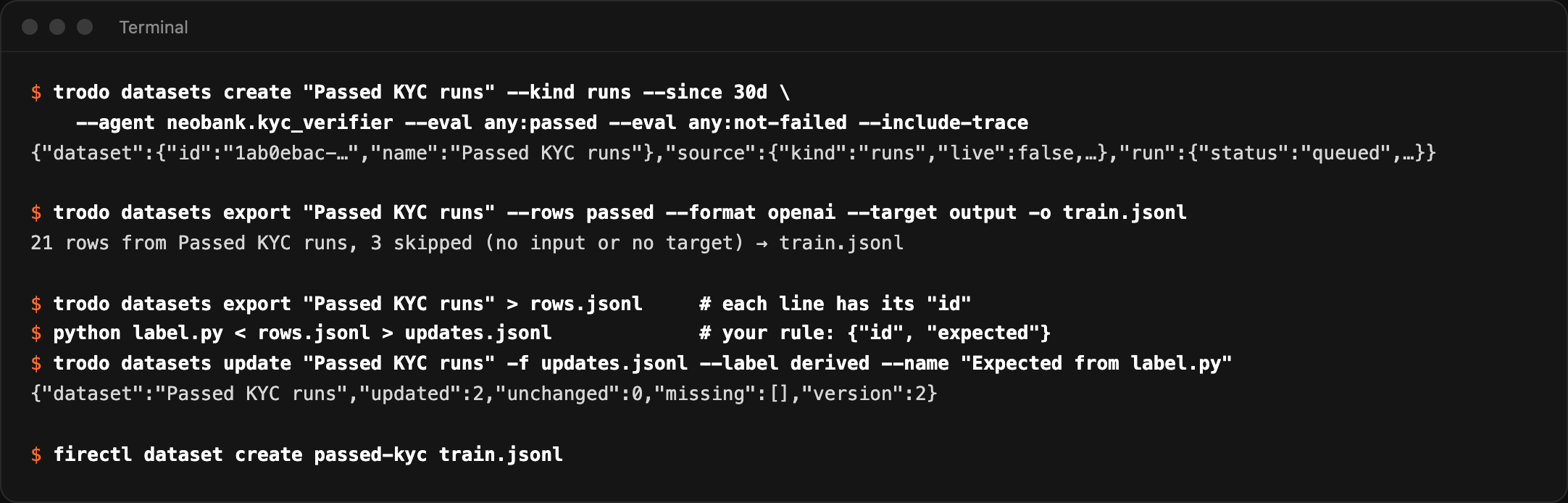
--kind and the filter flags give the dataset a source: what the filter matches is copied now, and with --live every 15 minutes after. --include-trace keeps every span of each run on its row. The filter is checked before anything is made, so a mistake never leaves an empty dataset behind. Without --kind, create makes an empty dataset. --description TEXT sets its description.
From a file instead, or as well: trodo datasets create "Golden set" -f rows.jsonl makes the dataset and adds the lines below in one step.
Add another source to an existing dataset:
trodo datasets add "Refund failures" --kind spans --since 7d --eval "Refund policy:failed"Append
trodo datasets append "Refund failures" -f rows.jsonl # or pipe lines inA line is either a plain row, or a reference Trodo fills in:
{"input": "Is the ATM fee refundable?", "output": "No.", "expected": "Yes, up to $10 a month."}
{"input": [{"role": "user", "content": "hi"}], "expected": "Hello! How can I help?"}
{"input": {"question": "Is the ATM fee refundable?"}, "expected": "Yes, up to $10 a month."}
{"run_id": "1538463a-..."}
{"span_id": "..."}  {"conversation_id": "..."}  {"eval_run_id": "..."}
input is text (the question), a list of messages, or named values (a prompt's variables). A line exported from a dataset goes back in as it was.
A reference becomes the same row as Add to dataset in the app: Input, Output and the evaluations, Expected empty. Add --include-trace to keep a run's spans. A unit the dataset already holds is skipped.
Write back: Expected, Output, metadata
trodo datasets export "Refund failures" > rows.jsonl                # each line has its "id"
python label.py < rows.jsonl > updates.jsonl                         # your logic
trodo datasets update "Refund failures" -f updates.jsonl --label derived --name "Expected from label.py"
A line is {"id": "...", "input": ..., "expected": ..., "output": ..., "metadata": {...}}; give only what changes, Input included. input is replaced the way rows are added (text, messages or named values), for a redacted email or a fixed typo. expected can be text or any JSON ({"answer": 10, "tool": "calculator"}). metadata merges into the row's own. The whole call is one dataset version, restorable in the app (⋯ → Versions). A changed Expected is recorded as a person's unless --label derived says a rule wrote it. Up to 5,000 rows per call; more are sent in batches.
Clean up: archive, restore, columns
trodo datasets archive "Refund failures" ROW_ID ROW_ID ...     # or ids on stdin, one per line or {"id": ...}
trodo datasets restore "Refund failures" ROW_ID
trodo datasets columns "Refund failures" --add lang,tier --derived q_len="LENGTH(input.query)"
Archive takes rows out of the working set: exports, labeling and sources skip them. Nothing is deleted. Each call saves a version, the row keeps its id, and restore brings it back. That is how a script removes duplicates or rows with personal data. Columns are only ever added: input columns by name, and derived columns from a path (input.q, metadata.tier) or an expression.
Export
trodo datasets export DATASET [--rows ...] [--eval NAME] [--min-score N] \
  [--format trodo|openai|dpo] [--target expected|output|expected-else-output] [--version N] [-o file]
--rows | Rows |
|---|---|
all | every row (default) |
expected / no-expected | with or without an Expected |
passed | each eval's newest verdict on the row passed, after people's corrections |
failed | an eval's newest verdict failed |
marked-wrong | a person marked a verdict wrong |
--eval NAME makes passed, failed and --min-score look at that eval only. --version exports a saved version instead of the live rows, for a reproducible training set. --format and --target work as in traces export. trodo datasets rows and trodo datasets download are the same command.
Evals
List the team's evals, explain one step by step with its options and outcomes, read verdicts by eval or by run, see every step a verdict took, mark verdicts right or wrong, and work through the review queue.
Prompts
Read, pull, edit, push and label managed prompts from the terminal, with the same versions and labels as the Prompts page.