
Prompts
Read, pull, edit, push and label managed prompts from the terminal, with the same versions and labels as the Prompts page.
A PROMPT argument is the prompt's name or id. The CLI names versions by number (5), as traces do (v5); the app shows the same versions by hash. --tag filters by the tags set through MCP; the app doesn't show them.
Read
trodo prompts list --table                              # --label production, --tag support to filter
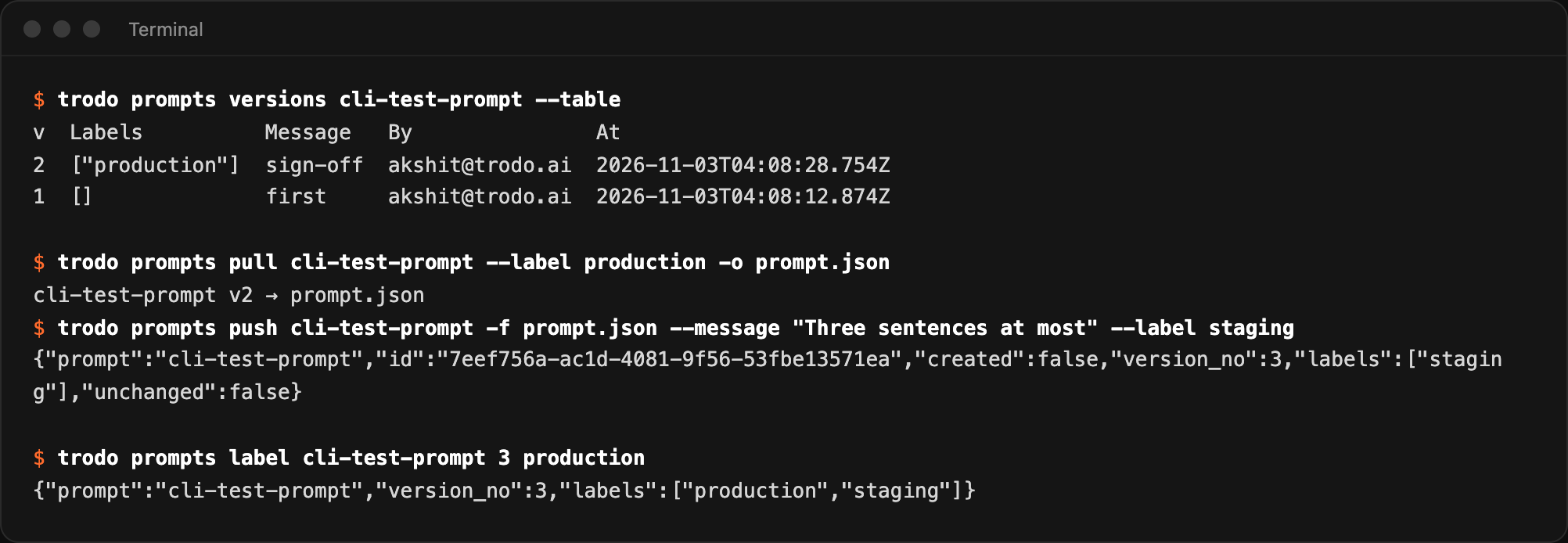
trodo prompts versions support-triage --table
trodo prompts get support-triage --label production     # or --version 4; the newest without either
Pull, edit, push
trodo prompts pull support-triage --label production -o prompt.json
# edit prompt.json
trodo prompts push support-triage -f prompt.json --message "Route refunds to billing" --label staging
pull writes { name, version_no, messages, model, tools, response_format, variables }. push makes a new version from such a file, or any JSON with messages. When no prompt has that name, push makes it first, with you as its owner. Content equal to the newest version cuts no version and says "unchanged": true.
Labels
trodo prompts label support-triage 5 production
trodo prompts label support-triage 5 staging --remove
Moving production changes what live agents run: an agent that fetches the prompt by that label gets the new version on its next call.
Only a prompt's owner and the editors they add can push or move labels. Anyone else is told to ask the owner.
Datasets
Make datasets from a filter, add rows and references, write Expected from your own scripts, and export them, from the terminal.
Issues and agents
Read, replay and close issues, and run agents and read their executions, from the terminal: the loop a coding agent runs to fix an issue, and how a script starts a labeling agent.