
Filters
The filter flags every traffic command takes: time, agents, any Traces property, and eval results down to what one step of an eval answered.
traces count, traces export, runs list, datasets create --kind and datasets add all take the same flags. They build the same filter as the Traces page and a dataset source, so a count in the terminal matches the count in the app.
What to pull
--kind spans | runs | conversations | verdicts (default runs)
| Kind | One row is |
|---|---|
spans | one span. LLM spans (what a model was sent and what it said) unless --any-span, or a --where on span.kind, span.name or span.tool_name says which. |
runs | one task: the run's input and final output. Add --include-trace to keep every span of the run. |
conversations | one thread: every run's input and output. |
verdicts | one eval result: what the eval decided, and a person's correction as Expected. The training set for the eval itself. |
When
| Flag | What it does |
|---|---|
--since 24h | 7d | 30d | 3m | 6m | 12m | today | yesterday | default 7d |
--from 2026-10-01 --to 2026-10-08 | dates or ISO times; a date as --to includes that whole day |
Which
| Flag | What it does |
|---|---|
--agent NAME | repeat for several |
--where "FIELD OP VALUE" | any property the Traces filter has. OP is =, !=, ~ (contains), >, >=, <, <=. Repeat to AND. |
--limit N | at most N rows |
--sample PCT | a stable sample (the same rows every time) |
--where "status=error"            # = takes a comma list: status=error,timeout
--where "total_cost>0.05"
--where "span.model~gpt-4o"       # span properties: on runs, a run that has such a span
--where "span.name=web_search"    # on spans, those spans, whatever their kind
--where "metadata.tier=pro"       # your metadata and attributes too
By eval results
--eval "NAME:CONDITION". NAME is an eval's name, any unique part of it, its id, or any. Repeat to AND.
| Condition | Rows where … |
|---|---|
failed / passed | the eval failed / passed |
not-failed | the eval did not fail |
marked-wrong / not-marked-wrong / marked-right | a person marked the verdict wrong / did not / marked it right |
score<0.5 | the verdict's score compares (<, <=, >, >=, =) |
reason=UNGROUNDED,TOO_LONG | the verdict's reason code is one of these |
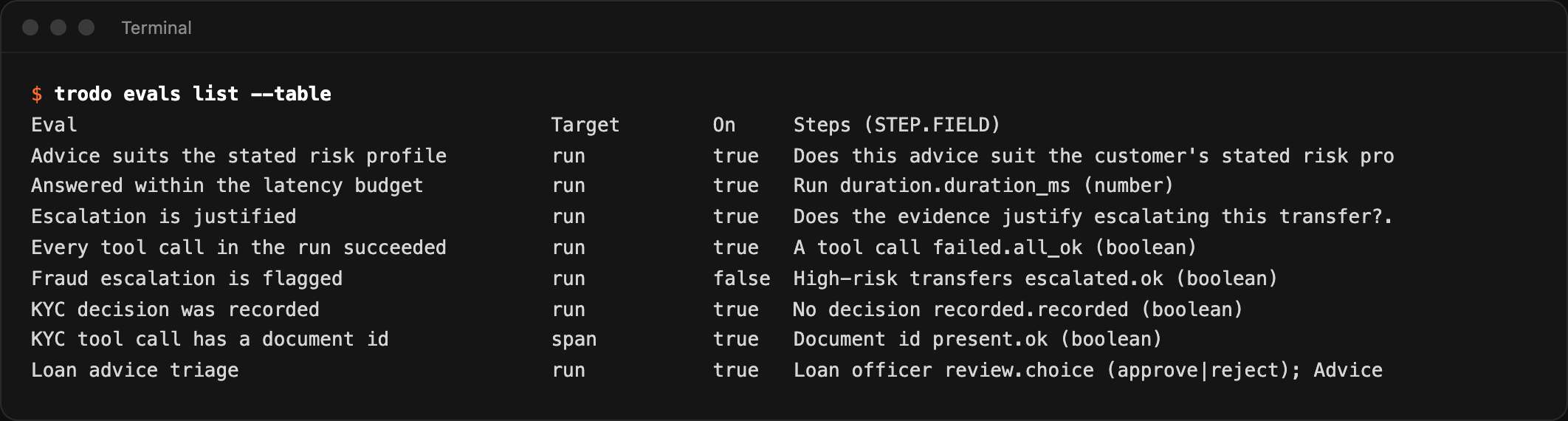
STEP.FIELD=VALUE | one step of the eval answered this. STEP is the step's id or the start of its name. |
--eval "any:passed" --eval "any:not-failed"        # passed every eval
--eval "Grounded:failed"
--eval "Rate the support:How good.rating<3"         # a number answer
--eval "Router:route.choice=billing,kyc"            # a choice answer, either option
--eval "KYC tool call:Document id present.ok=no"    # a yes/no answer
trodo evals list --table shows every eval and the STEP.FIELD names it answers.
Which verdict. A unit can be scored more than once: a new eval version re-scores it, and a conversation is scored again as it grows. A condition reads each eval's newest verdict on the unit (the highest version, then the latest), the one the app shows. A re-score still pending hides nothing. Every verdict ever given stays readable with --kind verdicts and trodo evals verdicts.
What the eval said, and what people said. failed, passed, scores, reasons and step answers are the eval's own decision. A person's thumbs are their own condition, so --eval "Grounded:failed" --eval "Grounded:marked-wrong" is the eval's mistakes, the set to fix it with. A dataset export's --rows passed applies people's corrections: a failed verdict marked wrong counts as passed there.
In the app, the same conditions are the Evals tab of the Traces filter: see Filtering by eval results.
Verdicts
With --kind verdicts, --eval picks which evals and these narrow the verdicts:
| Flag | What it does |
|---|---|
--outcome failed,passed,marked-wrong,marked-right | default failed |
--step STEP_ID | one step per row: its answer is Output, a person's correction of that step is Expected |
Sign in
Connect the CLI to your teams: trodo login in the browser, switching between teams, a key for CI, and what a key can do.
Traces
Count, measure and export production traffic by its eval results: stats against the previous window, rows in the dataset export shape, runs with every span, or fine-tuning examples, without making a dataset.