
LLM judge
A model you choose, on your own provider key, answering your prompt in a declared shape: prompts, template variables, outputs, reasoning, cost, and writing prompts that decide well.
An LLM judge sends your prompt, filled in from the trace, to a model you choose, and gets back exactly the fields the step declares. Use it for what needs judgement: whether an answer is relevant, complete, on-brand, in scope, safe; which of five failure types it is.
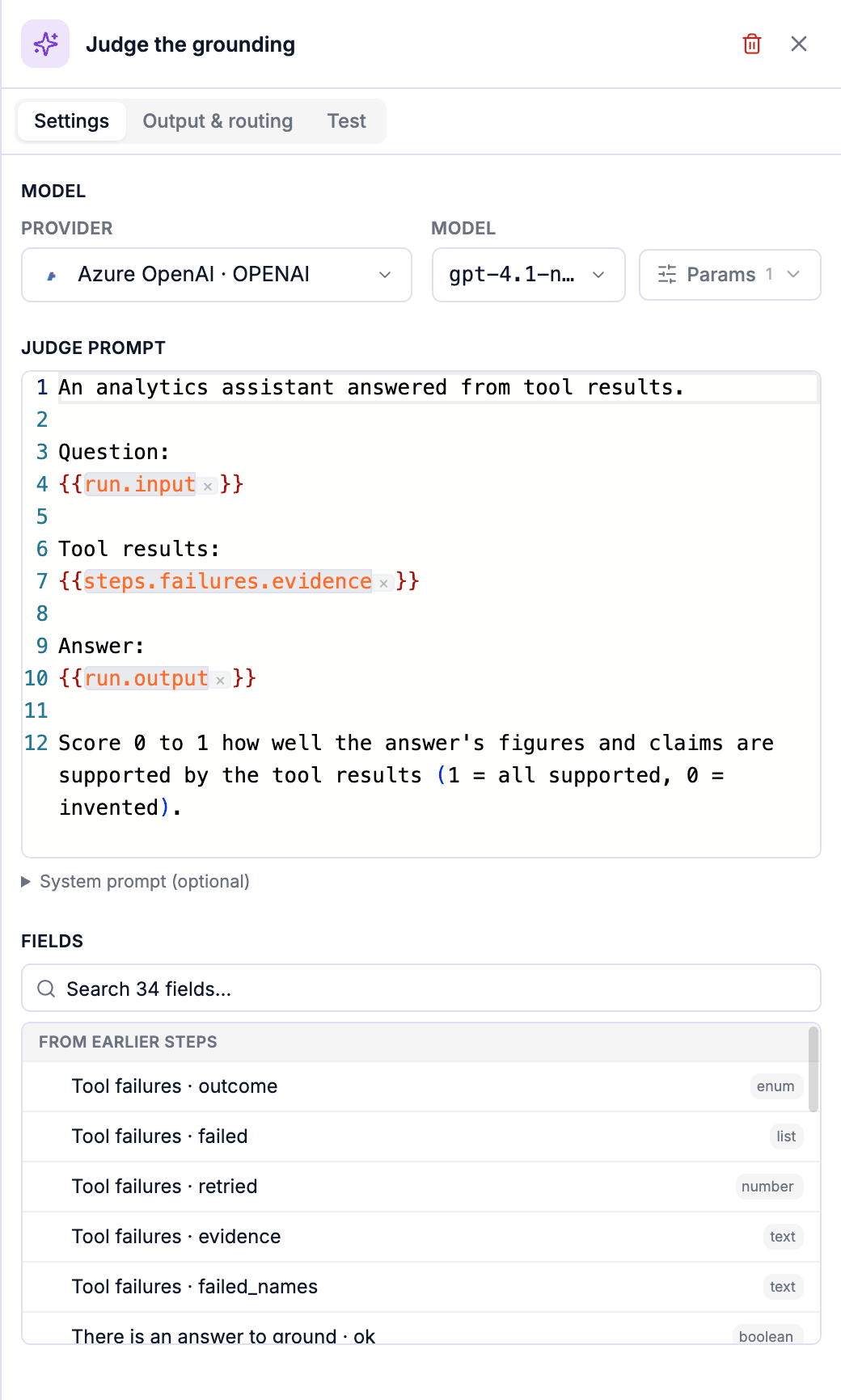
The model
Pick a Provider and Model from the providers you added in Settings → Models: OpenAI, Anthropic, Gemini, Azure OpenAI and OpenAI-compatible endpoints. The judge runs on your key: your provider bills you for its calls, and nothing else in an eval does. Params sets temperature (0 by default, judges should be repeatable), max tokens and top-p.
Each judge step picks its own model, so one eval can use a small, fast model for a first opinion and a stronger one only for the cases that reach it.
The prompt
Write what you want decided, and mark where trace data goes with {{…}}:
An assistant answered using tool results.

Question:
{{run.input}}

Tool results:
{{steps.gather.evidence}}

Answer:
{{run.output}}

Score 0 to 1 how well every figure and claim in the answer is supported by the tool results
(1 = all supported, 0 = invented).
You don't write the answer format. Trodo appends an instruction to reply with exactly the step's declared fields as JSON (a number between 0 and 1, one of your options, true or false) and checks what comes back. A malformed reply gets one corrective retry; a second one errors the result.
An optional System prompt sits behind a disclosure under the prompt.
Variables
| Variable | Level | What it holds |
|---|---|---|
{{run.input}}, {{run.output}} | Run, span (its run) | The run's question and answer |
{{span.input}}, {{span.output}}, {{span.name}} | Span | The span's own |
{{run.metadata.plan}}, {{span.attributes.region}} | Run, span | One key of your metadata or attributes |
{{conversation.transcript}} | Any | The whole thread, one line per turn: user: … / assistant: … |
{{conversation.last_user}}, {{conversation.last_assistant}} | Any | The two ends of the thread |
{{steps.<step>.<key>}} | Any | What an earlier step answered or passed on; a list renders as numbered lines |
{{steps.<judge>.reasoning}} | Any | An earlier judge's explanation |
Click a field in the list under the prompt to insert it. A variable that is empty on a trace renders as nothing; if no variable resolves, the result is errored rather than judged on an empty prompt.
What it returns
Declare the output on Output & routing:
| Declare | Ask for | Route |
|---|---|---|
| Number 0 to 1 | "Score 0 to 1 how…" | Ranges: fail below 0.5, a person 0.5 to 0.8, pass above |
| One of | "Pick one: complete, partial, missing" | One route per option |
| True / false | "Did the assistant comply? Answer true or false." | True / False |
The judge also returns its reasoning: shown on every result's path, and readable by later steps as {{steps.<judge>.reasoning}}.
Writing prompts that decide well
- Give it the evidence, not the haystack. Gather what matters in a Python step (the tool outputs, the retrieved passages, the expected answer) and pass exactly that. A judge given a whole trace does worse and costs more.
- Define the scale. "1 = every claim supported, 0 = invented" beats "rate the quality".
- Prefer categories to fine scores when you'll act on the category:
wrong / unhelpful / tone / otheris a report,0.63is not. - Leave the easy cases out. If a screen has already passed the clean answers, say so: "This answer's figures did not all appear in the tool output."
- Send the unsure band to a person. Route a middle range of scores to Human review; the grades become labels, and self-improving learns from them.
Cost and speed
A judge step is usually the slowest and the only billed-by-your-provider step in an eval. Its tokens and cost are recorded on every result, summed in Provider spend on Analysis, and estimated before you re-score history. Testing a judge in the editor calls your provider for real.
When it errors
| Reason | Meaning |
|---|---|
judge_no_model, judge_integration_not_found | No model picked, or the provider was removed from Settings → Models. |
judge_provider_error | The provider refused the call: a bad key, a retired model, a rate limit. The message is the provider's. |
judge_output_invalid | Two replies in a row did not match the declared fields. |
judge_template_unresolved | No variable in the prompt had a value on this trace. |
judge_template_scope | The prompt reads something this level can't. |
Semantic checks
True-or-false checks that read meaning without a judge call: Grounded (is every claim supported by the evidence?), Intent (does what you describe hold: answered, repeated, frustrated?) and Matches (is it like a known example?).
Human review and the grading queue
Send the cases a judge can't settle to a person: the Human review step, the grading queue, how grading finishes a walk, and audit disagreements.