
Testing and versions
Test an eval on real traces before it scores anything, save versions with notes, set one as production, restore an old one, and re-score history.
Testing
Click Test in the editor. On the left, recent traces of the eval's level: search, or paste an id. Pick one and Run the whole eval.
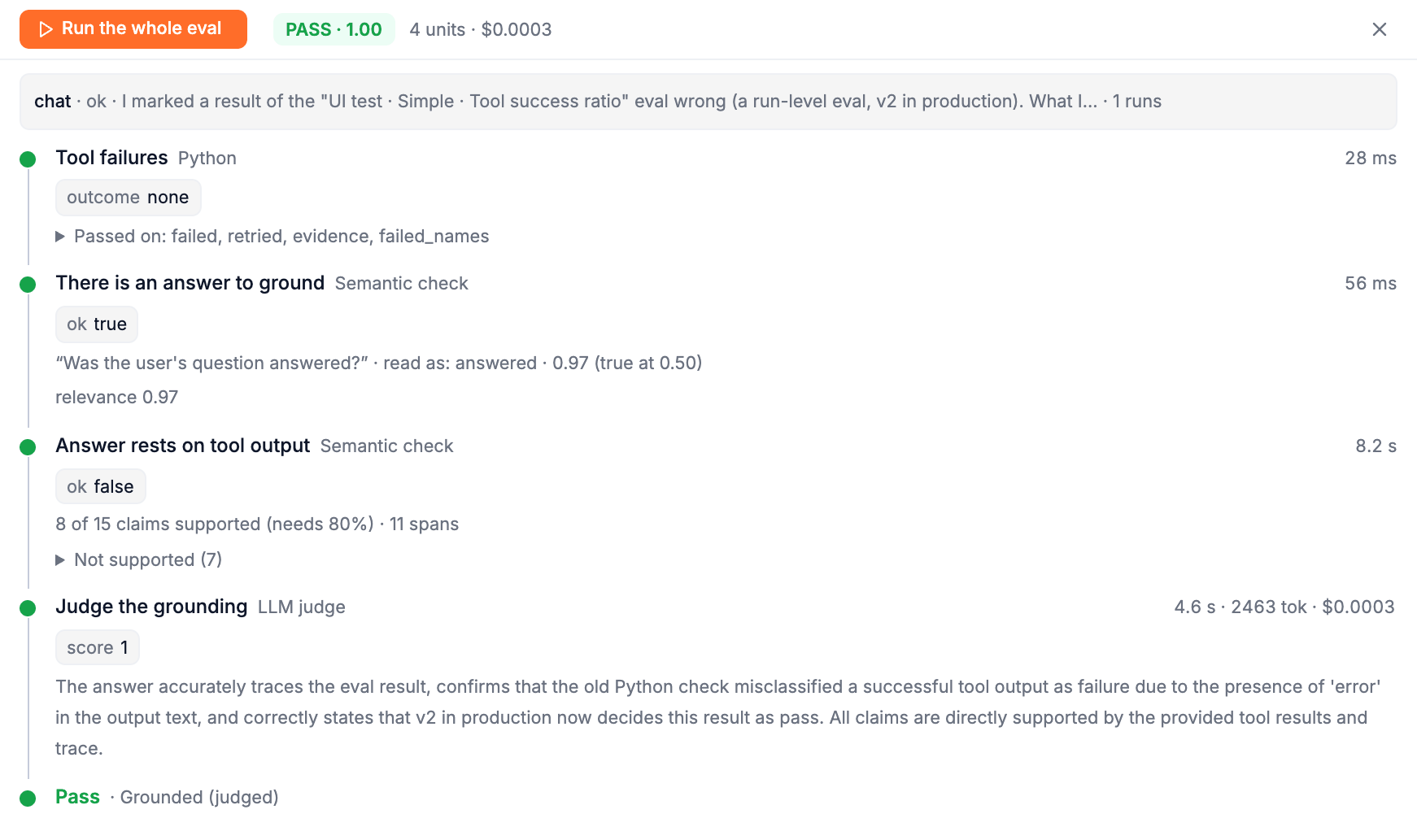
You see exactly what a result would look like: each step, what it answered, how long it took and what it cost, where it went, and the verdict. It tests what is in the editor now, saved or not.
- A test writes nothing: no result, nothing in the charts, nothing billed as an eval.
- A judge step really calls your provider, so a test costs what that call costs; the panel shows it.
- A Human review step stops the test at Waiting for a person and lists the options a grader would see.
- If the eval's filters would skip the trace, the panel says so: This eval's filter would skip this trace in production.
Inside a step's panel, the Test tab runs only this step or everything up to here on the same trace: the fastest way to debug one step's Python or prompt.
Saving a version
Save asks for a note, What changed, and why? This is the version's note, and writes the next version. If the change would have decided recent results differently, the dialog says how many first: Of 120 verdicts in the last 30 days, 3 would change (2 pass to fail, 1 fail to pass). (A change to a judge isn't replayed over history, because that would call your provider for every past result.)
Then it asks whether to put the new version into production now: Set as production, or Keep as draft to go on editing. A draft version shows a draft badge in the editor.
Versions
Open Versions from the editor or the results page. Every version, newest first, with its note, when, who made it, and a short fingerprint of its content. Two versions with the same fingerprint do the same thing.
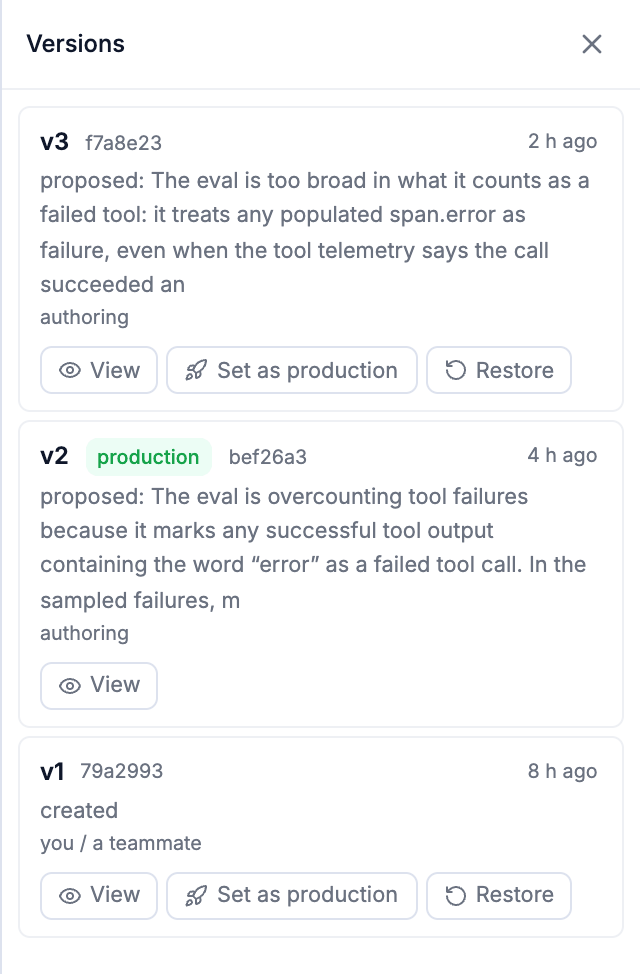
| Action | What it does |
|---|---|
| View | Opens that version in the editor, read-only. |
| Set as production | Every new run is scored by v3 from now on. The version in production today stays in the history. |
| Restore | Writes a new version equal to this one, not in production until you set it. History is never rewritten. |
v2 is saved. Nothing changes yet: v1 still scores every new run.
Results record the version that scored them. Set a new version as production and the old version's results stay exactly as they were; Analysis puts the versions side by side.
Re-score history
A new version only scores new traffic. To see how it would have decided the past, turn on Re-score history when production changes in Settings: Time (the last N hours or days) or Volume (the last N runs). Each time a version is set as production, Trodo re-scores that window under it, newest first, behind live traffic, and the new results sit beside the old ones, marked Re-scored.
Re-scoring runs straight away when it can't cost you anything unexpected. It waits for your go-ahead when:
- the new version changed a judge: re-scoring 1,240 runs re-runs it at your provider's cost, or
- a person can be reached: re-scoring could put items in the grading queue.
The confirmation shows the estimate (runs, units and provider spend) with Re-score history or Not now (start it later from Versions). The Versions panel shows progress: Re-scoring history: running · 480 of 1,240 runs, with Cancel.
Who changed what
Every version records who made it: you / a teammate for people, authoring for versions Lucid proposed. See Who did what.
Filters and sampling
Decide which traffic an eval scores: filters on any trace field (one agent, spans by name or kind, runs inside a conversation) and sampling to score a steady share. Plus Filter steps inside an eval.
Results and analysis
Read what an eval decided: every verdict and its path, Analysis with versions side by side, marking results wrong, the scores in your trace views, searching traces by eval results, and alerts on evals.