
Self-improving evals
An alert on the eval and an agent that has Lucid improve it when the alert fires: proposed changes to the eval, fixes for your agent, and how you decide what ships.
Evals drift. Your agent changes, your users change, and a judge prompt that was right in March passes things in June it shouldn't. A self-improving eval notices and does something about it: when its results start to look wrong, Lucid reads them, decides whether the eval or the agent is at fault, and proposes a fix to the eval, to the agent, or to both. Nothing changes until you approve it.
How it works
Self-improving isn't a hidden scheduler. Turning it on creates two ordinary things you can see and edit where they live:
- An alert on the evalWhen failures are at or above 5 over 1 hour. It lives in Alerts as Self-improving · your eval.
- An agentThe alert starts it; its one step, Improve eval, runs Lucid with your instructions. It lives in Agents as Improve eval · your eval.
- Lucid investigatesReads the results behind the alert, what each step answered, and the traces they scored.
- A proposed changeA new version of the eval, not in production, and what to fix in the agent. It waits in Proposed changes; with a Slack channel on the alert, it is posted there too.
Turning it on
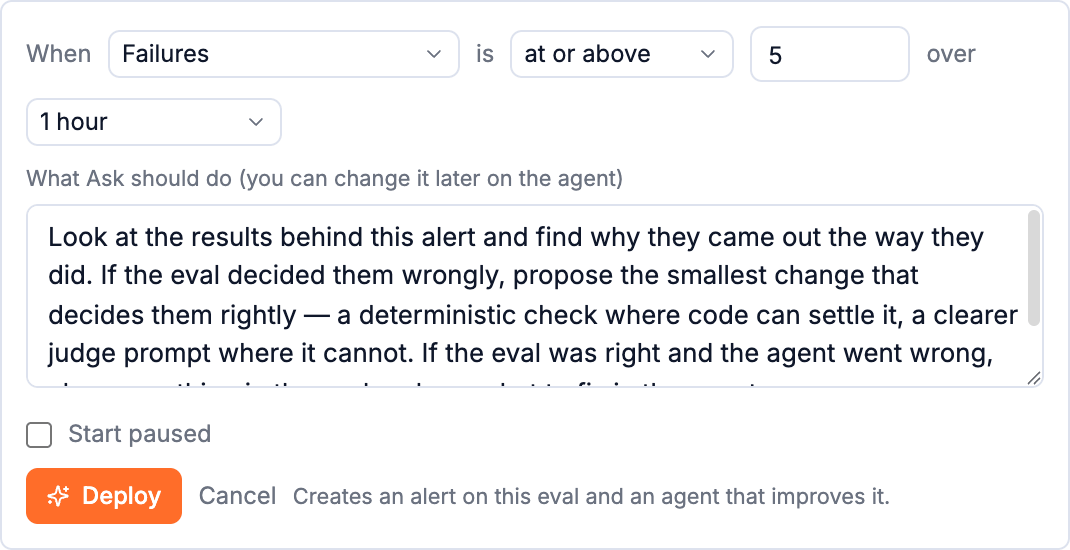
Open the eval's Settings in the editor and click Deploy self-improving under Self-improving.
| Setting | |
|---|---|
| When | The measure to watch (Failures, Pass rate, Results marked wrong, Audit disagreements, Errored, Waiting for a person or Average score), how to compare it (at or above, above, below, at or below a value) and over how long (15 minutes to 7 days). |
| What Lucid should do | The instructions the agent gives Lucid. The default: find why the results came out the way they did; if the eval decided them wrongly, propose the smallest change that decides them rightly, using code where code can settle it and a clearer judge prompt where it can't; if the eval was right and the agent went wrong, change nothing in the eval and say what to fix in the agent. |
| Start paused | Create both, switched off. |
Deployed, the panel shows Live or Paused, a sentence saying what it watches, links to the Alert and the Agent, and when it last fired.
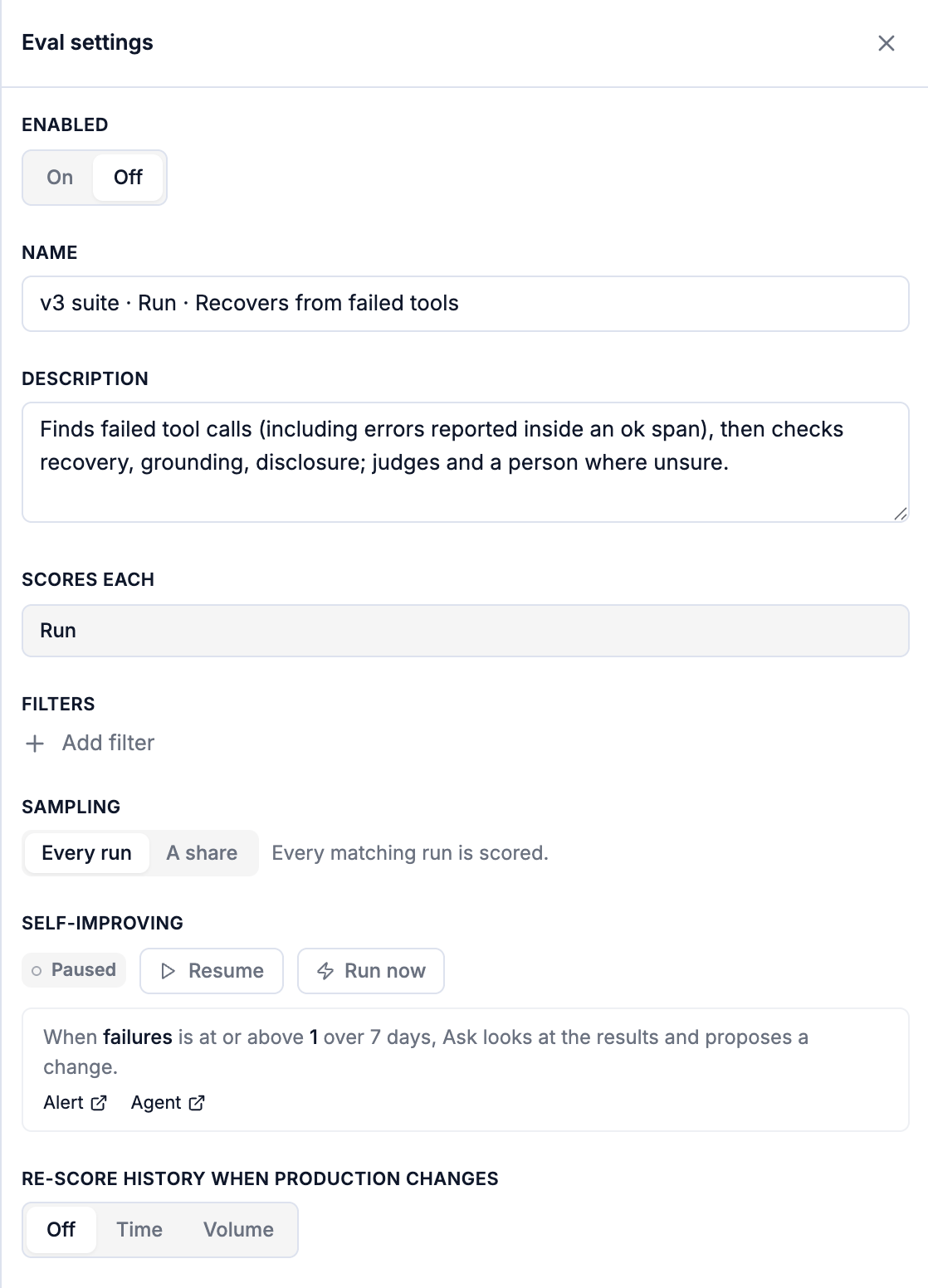
- Pause / Resume switch the alert and the agent together.
- Run now runs the agent once, straight away, with the alert's current value, paused or not. The proposal appears in a minute or two.
- To change the condition, the instructions, or add a Slack step, edit the alert or the agent directly.
What Lucid does
Given the results behind an alert (or the ones you marked wrong, or recent failures):
- Reads the evidence: each result, what every step answered, and the trace it scored.
- Checks production first. Results scored by an older version are re-checked against the version in production now. If production already decides them the way people said, nothing is proposed, because the fix is already live.
- Decides who is wrong. If the eval decided them wrongly, it designs the smallest change that decides them rightly. If the eval was right and the agent misbehaved, it leaves the eval alone.
- Tries it. The changed eval is walked on those same traces with its Python run for real, and one failed attempt is retried.
- Weighs it. What else the change would flip on recent results, and whether it breaks any result a person labelled.
- Records it as a proposed change: a new version, not in production, plus what to fix in the agent whenever the agent was genuinely wrong.
Proposed changes
Every proposal lands in one feed, Evals → Proposed changes: the ones self-improving raised, the ones you asked Ask for, and the ones that came from marking results wrong. New ones are marked; the count beside the button is what's waiting for you.
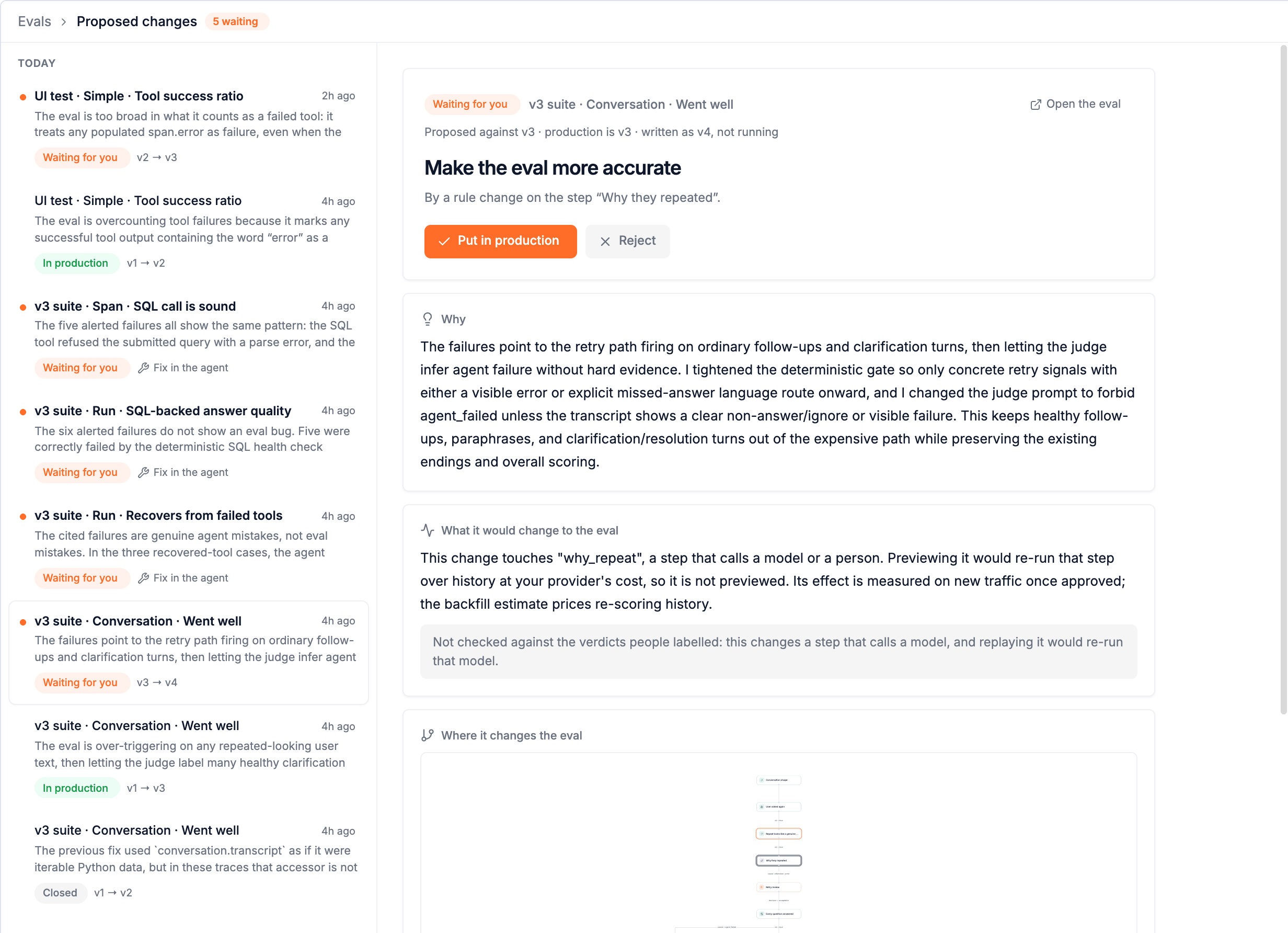
A proposal to change the eval shows:
- What kind of change (Make the eval more accurate) and which step it touches: a rule, worked examples for the judge, a new judge prompt, or a new step.
- Why it is proposing this, in plain words.
- What it would change to the eval: how many recent results it would flip, each way, and whether it gets any result a person labelled wrong.
- Where it changes the eval: the step map, with the changed steps marked.
- Why this came up: the traces that prompted it, with what people said.
| Action | |
|---|---|
| Put in production | Sets the proposed version as production. If production moved since the proposal was made, the change is re-applied on top of it as a new version. Your re-score policy runs as for any version. |
| Reject | Say why (too broad: it would let real failures through). The reason is kept, and the next proposal learns from it. |
| Revert | For a change already in production: production goes back to the version before it. |
Fixes for your agent
When the eval was right and the agent was wrong, the proposal is Fix the agent: no eval change, and a summary for your engineers of what the agent does wrong, how often, where the eval saw it, and what to change. Not code. The instruction to add, the tool to harden, the error to handle.
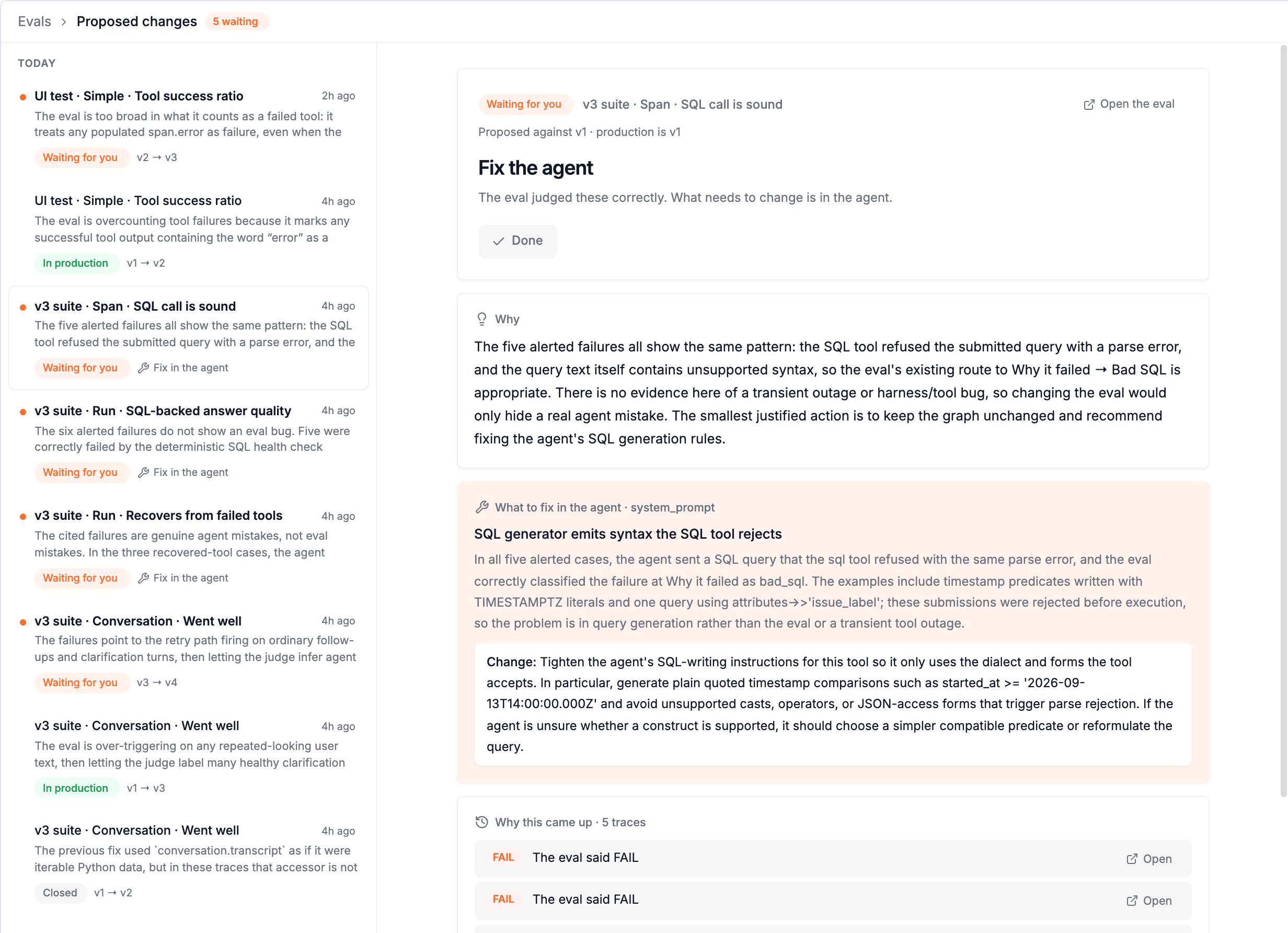
Mark it Done once your team has fixed it, with a line on what was done (added a rule to the system prompt). A proposal can carry both: a better eval and a fix for the agent.
Staying in control
- A proposal is a version like any other. Nothing runs until someone puts it in production.
- Every proposal says what it would flip and whether it contradicts a person's label.
- Every version records who made it; Lucid's show as authoring. See Who did what.
- Rejections are remembered. So are your marks on results: the more you label, the better the next proposal.
Results and analysis
Read what an eval decided: every verdict and its path, Analysis with versions side by side, marking results wrong, the scores in your trace views, searching traces by eval results, and alerts on evals.
Evals with Lucid
Create evals by describing them, ask why results fail, improve an eval in plain words, and read any eval's results. Lucid works from your real traces.