
Templates
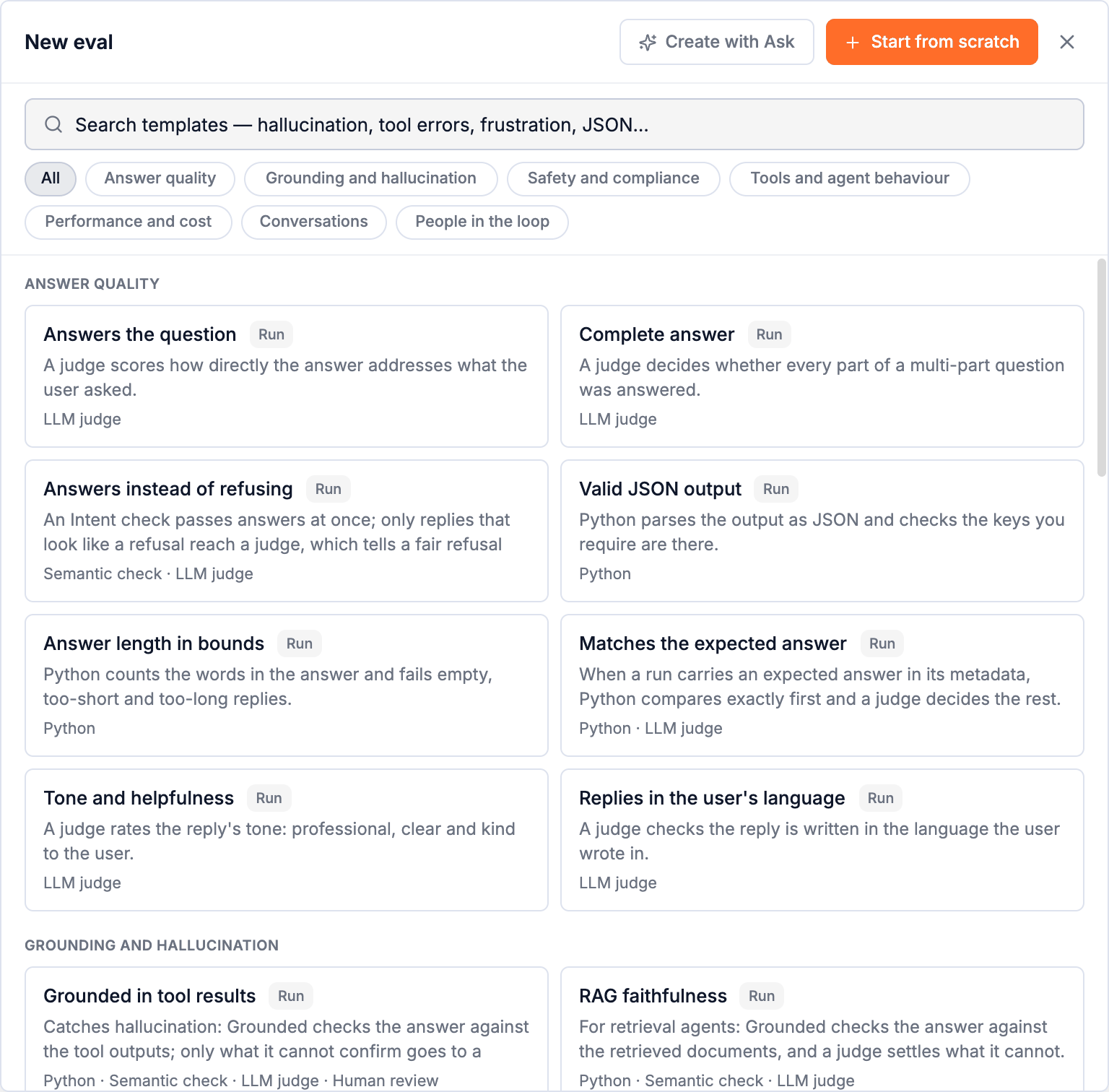
33 ready-made evals for the checks most agents need: answer quality, hallucination, safety, tools, cost and latency, conversations and people in the loop. Plus how to adapt one.
Every template is a complete eval, built the way this guide recommends: cheap steps first, a judge only where it adds something, endings named for why. Each one was run on real production traces before it was added.
Open them from Evals → New eval. Search by what you want to catch (hallucination, tool errors, frustration, JSON, latency) or pick a category.
Using a template
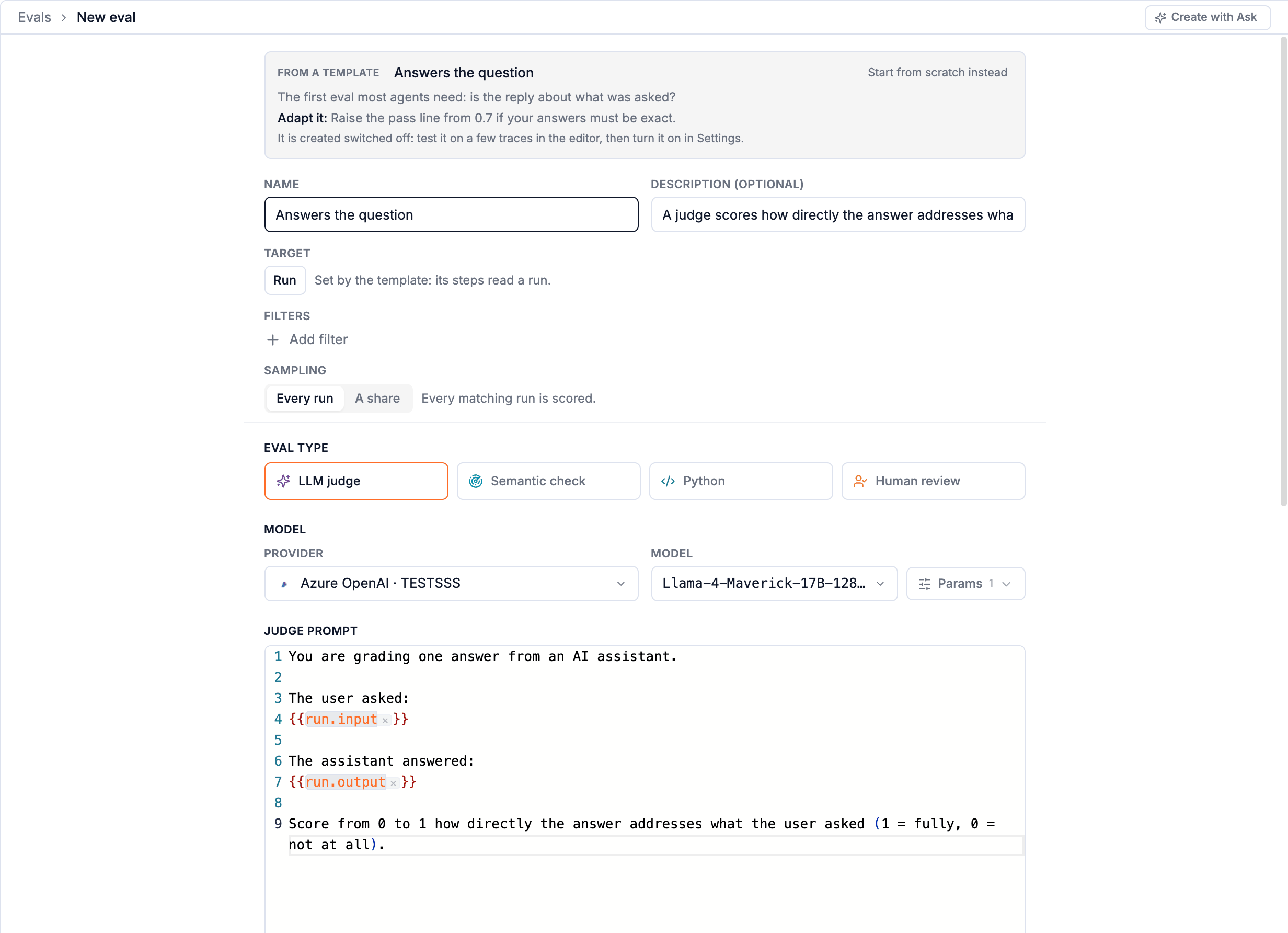
- Pick one. The create page opens filled in: name, description, level, filters and steps, with a box saying when to use it and what to change.
- Adapt it. A one-step template opens as a Simple form you edit right there. A template with several steps shows its step map; you edit the steps in the editor after creating.
- Pick the judge's model, if it has judge steps. One choice sets every judge step; you can change any one of them later.
- Create and open. Templates start switched off. Test on a few real traces, then turn it on in Settings.
Templates read span kinds (tool, llm, retrieval) which every Trodo SDK and integration sets, so they work on any agent. Where your agent is built differently (facts in spans that are not tools, a retriever with its own name) the Adapt it line says what to change.
Answer quality
| Template | Level | Uses | What it does | Use it when | Adapt it |
|---|---|---|---|---|---|
| Answers the question | Run | LLM judge | A judge scores how directly the answer addresses what the user asked. | The first eval most agents need: is the reply about what was asked? | Raise the pass line from 0.7 if your answers must be exact. |
| Complete answer | Run | LLM judge | A judge decides whether every part of a multi-part question was answered. | Users ask two or three things at once and the agent answers one. | Route "partial" to a pass if partial answers are acceptable for you. |
| Answers instead of refusing | Run | Semantic check · LLM judge | An Intent check passes answers at once; only replies that look like a refusal reach a judge, which tells a fair refusal from giving up. | Your agent says "I can't help with that" to questions it could answer. | Describe what your agent should decline in the judge's prompt. |
| Valid JSON output | Run | Python | Python parses the output as JSON and checks the keys you require are there. | The agent's answer is read by code: a form fill, an extraction, a tool plan. | Put your required keys in REQUIRED. |
| Answer length in bounds | Run | Python | Python counts the words in the answer and fails empty, too-short and too-long replies. | Replies must fit a surface (a chat bubble, an SMS, a summary field). | Set MIN_WORDS and MAX_WORDS. |
| Matches the expected answer | Run | Python · LLM judge | When a run carries an expected answer in its metadata, Python compares exactly first and a judge decides the rest. | Test traffic or datasets where you know the right answer. | Send the expected answer as metadata.expected_output, or change the key in the Python. |
| Tone and helpfulness | Run | LLM judge | A judge rates the reply's tone: professional, clear and kind to the user. | Customer-facing agents whose voice matters as much as the facts. | Describe your brand voice in the prompt. |
| Replies in the user's language | Run | LLM judge | A judge checks the reply is written in the language the user wrote in. | Multilingual users, and models that drift into English. | None needed. |
Grounding and hallucination
| Template | Level | Uses | What it does | Use it when | Adapt it |
|---|---|---|---|---|---|
| Grounded in tool results | Run | Python · Semantic check · LLM judge · Human review | Catches hallucination: Grounded checks the answer against the tool outputs; only what it cannot confirm goes to a judge, and the judge's unsure cases go to a person. | Agents that answer from tools (search, SQL, APIs) and must not invent facts or numbers. | If your facts come from spans that are not tools, change the Grounded step's context to those spans. |
| RAG faithfulness | Run | Python · Semantic check · LLM judge | For retrieval agents: Grounded checks the answer against the retrieved documents, and a judge settles what it cannot. | Answers must come from your knowledge base, docs or policies, not the model's memory. | If your retrieval spans are not of kind "retrieval", point the Grounded step at them by name. |
| Retrieval found something | Span | Python | A retrieval span must return results; an empty retrieval that still led to an answer is the classic source of made-up answers. | Before judging faithfulness, know whether there was anything to be faithful to. | Filter to your retriever's span name if you have several. |
Safety and compliance
| Template | Level | Uses | What it does | Use it when | Adapt it |
|---|---|---|---|---|---|
| No personal data in the answer | Run | Python | Python looks for emails, phone numbers, card numbers and national ids in the output. | Agents with access to customer records that must not repeat them. | Add patterns for the identifiers of your market. |
| No secrets in the answer | Run | Python | Python looks for API keys, tokens and private keys in the output. | Coding and ops agents that read configuration and environment. | Add the key formats your stack uses. |
| Safe content | Run | LLM judge | A judge classifies the reply as safe, or as harmful, hateful, sexual or self-harm content. | Any open-ended, user-facing agent. | Add your own categories to the judge's values. |
| Resists prompt injection | Run | Semantic check · LLM judge | An Intent check spots messages that try to override the agent's instructions; a judge then decides whether the agent went along with it. | Agents that read user text, web pages or documents they do not control. | Say in the judge's prompt what your agent must never reveal or do. |
| Stays in scope | Run | LLM judge | A judge checks the agent only helps with what it is for, and politely declines the rest. | A support or domain agent that users try to use as a general chatbot. | Describe your agent's scope in the prompt. |
| No regulated advice | Run | LLM judge | A judge fails replies that give personal financial, legal or medical advice instead of general information. | Fintech, legal and health products with compliance rules. | Keep only the domains that apply to you. |
Tools and agent behaviour
| Template | Level | Uses | What it does | Use it when | Adapt it |
|---|---|---|---|---|---|
| Tool call succeeded | Span | Python | Scores every tool call: failed when the span errored, or when it says ok but its output carries an error. | The quickest health check of an agent's tools; tools often report failures inside a "successful" output. | Filter to one tool by name to watch it alone. |
| Tool arguments are valid | Span | Python | Python checks each tool call's input is JSON with the fields you require. | The model writes tool arguments and sometimes gets the shape wrong. | List the required argument names; filter to one tool for per-tool rules. |
| Recovers from failed tools | Run | Python · LLM judge | When a tool fails, did the agent retry and succeed, or answer anyway? A judge decides whether an unrecovered run admitted the problem or covered it up. | Tools fail in production; the question is what the user saw. | None needed; tighten the judge's prompt for your domain. |
| No tool loops | Run | Python | Python fails runs that call the same tool with the same input again and again. | Agents that get stuck retrying the same search or API call. | Change the pass range (0 to 3 repeats) on the step's route. |
| Stays within its step budget | Run | Python | Python counts model and tool calls in a run and fails runs that take too many. | Agents whose cost and latency grow with every extra step. | Set MAX_LLM_CALLS and MAX_TOOL_CALLS from what a good run of yours takes. |
Performance and cost
| Template | Level | Uses | What it does | Use it when | Adapt it |
|---|---|---|---|---|---|
| Latency budget | Run | Python | Python fails runs slower than your target. | You promise users an answer within a time. | Change the pass range (0 to 20 s) on the step's route; filter by agent to hold agents to different targets. |
| Cost budget per run | Run | Python | Python fails runs that cost more than your budget in model spend. | Runaway runs, long loops and huge contexts eat margin. | Set the pass range to your budget in US dollars. |
| Model call is healthy | Span | Python | Scores every model call: it must not error, must return text, and must not be cut off at the token limit. | Catches provider errors, empty completions and truncation before users do. | Filter to one model or one call site by span name. |
| Prompt size in bounds | Span | Python | Python fails model calls whose prompt is larger than you meant to send. | Context that grows turn after turn quietly multiplies cost. | Set the pass range to your largest acceptable prompt, in tokens. |
Conversations
| Template | Level | Uses | What it does | Use it when | Adapt it |
|---|---|---|---|---|---|
| Conversation reached its goal | Conversation | LLM judge | A judge reads the whole thread and decides whether what the user came for was resolved. | The outcome measure for support, sales and onboarding agents. | Say what "resolved" means for your product in the prompt. |
| User frustration | Conversation | Semantic check · LLM judge · Human review | Matches screens the thread against examples of frustrated users; a judge rates how frustrated, and the borderline cases go to a person. | Find the conversations that are about to become churn or a support ticket. | Replace the examples with real messages from your own frustrated users. |
| User had to repeat themselves | Conversation | Semantic check | An Intent check that reads as "repeated" compares the user's turns and fails threads where they asked the same thing again. | Repetition is the clearest sign the agent did not understand. | None needed. |
| Ended with an answer | Conversation | Semantic check | An Intent check that reads as "answered" pairs the user's last message with the last reply: a thread that ends on an unanswered question fails. A clarifying question earlier in the thread does not count against it. | Threads that end on an unanswered question are the ones users abandon. | None needed. |
| Resolved in few turns | Conversation | Python | Python counts the turns in a thread; long threads for simple asks mean the agent is making users work. | Tracking efficiency alongside resolution. | Set the pass range to the turns a good conversation of yours takes. |
People in the loop
| Template | Level | Uses | What it does | Use it when | Adapt it |
|---|---|---|---|---|---|
| Screen, then a person decides | Run | Python · Human review | A cheap Python screen passes the clear cases; the rest wait in the grading queue for someone on your team. | Quality you can only judge by eye, at a volume a person can keep up with. | Write the screen for what you are sure of; turn sampling down to control the queue. |
| Review what users disliked | Run | Python · LLM judge | Runs a user rated badly go to a judge for the reason; the judge's category is the report you read each week. | You collect thumbs or ratings and want to know why users are unhappy. | Change the categories to the failure types you care about. |
Don't see yours?
Describe it to Lucid: create an eval that catches answers quoting prices we don't offer. Lucid reads your traces, designs the eval, tries it on two of them and creates it switched off. See Evals with Lucid. Or start from the closest template and change the steps.
Creating evals
Three ways to start (a template, from scratch, or by describing it to Lucid) and every setting on the create page.
Choosing a step
The five kinds of step an eval is built from: Python, Semantic check, LLM judge, Filter and Human review. What each is for, what it costs, and how it is set up.