
How triage works
Decide the easy cases cheaply and send only the hard ones to a judge or a person. When to use which step, and how to design an eval that is both cheap and right.
A judge is the most flexible way to grade an answer, and the most expensive, the slowest, and not always the most exact. Most of your traffic doesn't need it. An empty answer is a fail; a Python rule can see that for free. An answer whose every figure appears in the tool output is grounded; a small model can confirm that in milliseconds. The judge should spend its time, and your money, on what is genuinely hard.
A Triage eval is built that way: cheap steps first, each deciding what it can and routing the rest onward.
What it saves
Move the sliders: your traffic, how much of it the cheap steps settle, and what one call to your judge costs.
Provider spend only: what your model provider bills for judge calls on your key. Steps that are not judges make no model call. Trodo’s own usage is counted separately, one unit per step run.
The saving isn't only money. Traces the screens settle get a verdict in milliseconds rather than seconds, and they are decided exactly: a rule doesn't have off days.
The patterns
Most good evals are one of these shapes.
- Screen, then judgePython or a Semantic check decides the clear passes and clear fails. Only the rest reach the judge. The default shape for quality evals.
- Gather, then checkPython collects the evidence (tool outputs, retrieved documents, the expected answer) and passes it on. A Semantic check or judge reads exactly that.
- Judge, then a personThe judge's clear scores decide. The unsure middle band goes to Human review, and every grade becomes a label the eval learns from.
- Classify, then explainA cheap step finds the failures; a judge says why, as one of a few categories. The categories become your report.
The template Grounded in tool results uses three of them at once:
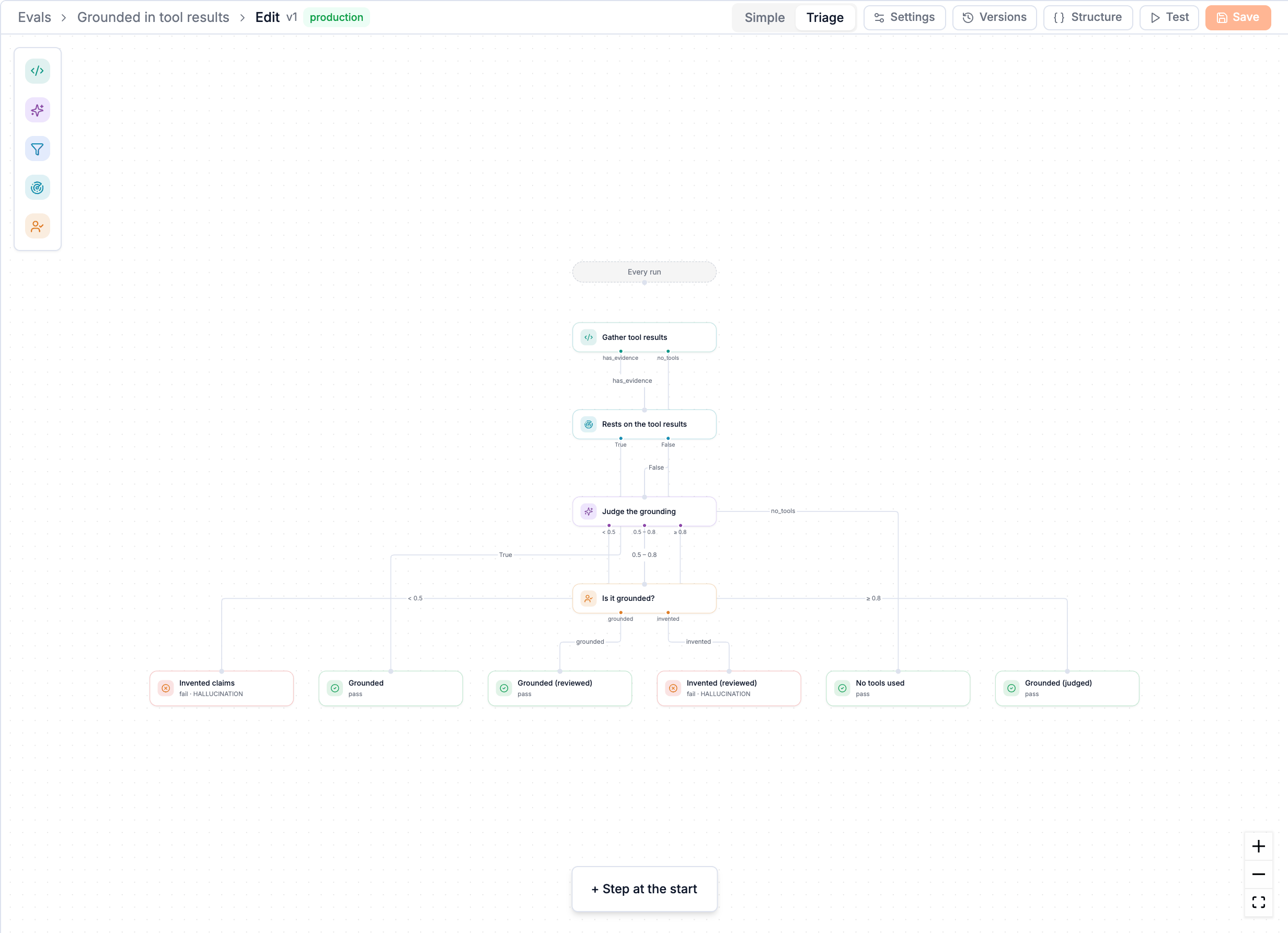
- Gather tool results (Python) collects every tool's output into
evidence. A run with no tools passes straight away: there is nothing to be grounded in. - Rests on the tool results (Semantic check, Grounded) splits the answer into claims and checks each against the tool outputs. If 80% or more are supported it passes, with no judge call.
- Judge the grounding (LLM judge) reads the same evidence and scores the rest: below 0.5 fails, 0.8 and up passes.
- Is it grounded? (Human review) gets the 0.5 to 0.8 band, where the judge was unsure, and a person decides.
Choosing a step
| You want to know… | Use | Why |
|---|---|---|
| Is a field set, a status ok, a number in range, a pattern present? | Python or a Filter step | Exact and free. Anything code can decide, code should decide. |
| Is the output valid JSON with the right keys? Under a length? Free of emails and API keys? | Python | A parse or a regex is the whole answer. |
| Does every claim in the answer appear in the tool results or documents? | Semantic check → Grounded | Reads meaning claim by claim, checks figures exactly, no model call. |
| Was the question answered? Did the user repeat themselves? Is the user frustrated? | Semantic check → Intent | Describe it in plain words; it reads it as the right kind of check. |
| Is this like a failure we already know? | Semantic check → Matches | Compare with example texts you paste in. |
| Is the tone right? Is it in scope? Is it safe? Which of these five failure types is it? | LLM judge | Nuance and categories. Give it only what the cheaper steps couldn't settle. |
| We can't tell without a human. | Human review | Never first; always behind a screen, so a person sees a trickle, not a flood. |
See Choosing a step for each one in depth.
Simple or Triage
| Simple | Triage | |
|---|---|---|
| Shape | One step, and a rule for which answers pass | Steps that route to each other, on a canvas |
| Built | In a form, on the create page | In the editor, after creating |
| Good for | One clear question: a judge's score, a Python rule, one Semantic check | Anything where cheap checks can decide part of the traffic |
They are the same kind of eval: a Simple eval is just a one-step graph. You can open any Simple eval in Triage and keep adding steps; an eval that is back to one step and a pass/fail reads as Simple again.
How to know the screens are right
A screen that sends a trace straight to an ending saves a judge call, but if the screen is wrong, nobody sees the judge's opinion. Two things keep that honest:
- The audit slice. A small, fixed share of traffic (0.5% by default) walks the full path even when a screen would have ended it: the screen's decision is recorded, and the walk carries on to the judge. When they disagree, the case goes to the grading queue under Audit disagreements for a person to rule on. Screen accuracy in Analysis shows how often each screen's shortcut disagreed with the full path.
- People marking results wrong. A 👎 on a result is a label. Enough of them on the same eval, and self-improving proposes a better version.